


My Bible - Verse+Audio
4.85.14K Reviews
App Specs
- Version
- 1.1.0
- Updated On
- License
- Free
- Downloads
- 10,000,000+
- Developer
- JATHLEHEM LIMITED
- Categories
- Books & Reference
- Platform
- Android, iOS
Screenshots


 Analysis by AppCompare
My Bible is most useful when I want a passage close by but don’t have a book to hand, or when I’d rather listen than stare at a screen. I think of it as a small, portable aid for a reading habit, not a replacement for every kind of Bible study. Its mix of reading, audio and a daily verse gives me a few simple ways to begin, whether I have a quiet stretch of time or only a spare minute.
A practical fit for a small daily routine
If I’m trying to make scripture part of an ordinary day, the hardest part is often not finding a long block of time; it’s remembering to pause at all. A daily verse can serve as that prompt. I might read it over breakfast, return to it during a break, and use it as a starting point for a longer passage later. That modest routine is where this app makes the most sense: it lowers the effort of opening a Bible without insisting that every session become a study project.
Offline access is especially helpful when the day takes me away from a reliable connection. I can prepare a reading before leaving home, then use the app in a waiting room or while travelling without treating mobile coverage as part of the plan. I’d still check that the material I expect to use is available offline before relying on it for a long trip. That small bit of preparation is more dependable than assuming every part of an app will work in every setting.
From a verse to a more focused reading
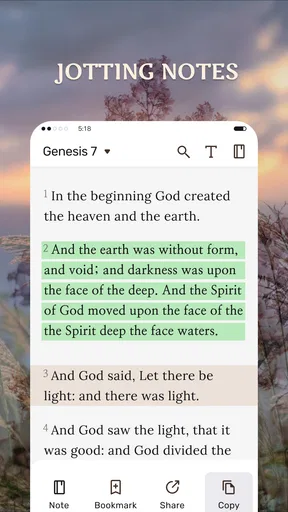
A useful way to approach the daily verse is to avoid treating it as a complete answer by itself. If a line catches my attention, I can move into the Bible and read the surrounding passage for context. Then I can bookmark or highlight the verse and add a note about what stood out. That sequence—prompt, context, personal record—turns a quick glance into something I can revisit, rather than leaving the verse as a momentary notification.
Audio offers a different route through the same routine. At home, I might listen while tidying up, then switch back to text if I want to pause over a phrase or compare translations. On a commute, listening can make scripture more accessible, but I wouldn’t try to navigate the app while driving; choosing a passage before setting off is the safer, less distracting approach. The handoff between listening and reading is valuable precisely because the two modes suit different moments, not because one is always better.
Where personal reading meets other tools
Compared with a printed Bible, a phone is easier to carry and gives me audio, notes and saved passages in one place. The trade-off is that a screen can pull attention toward messages and other apps, while a physical book can make a deliberate, distraction-free session easier. Compared with a dedicated study resource, this is a more approachable everyday companion; readers who need detailed reference tools or a structured curriculum may prefer a resource built around those needs and use this app for quick reading instead.
Sharing a verse can also bridge private reading and conversation. I’d use that option when a passage genuinely fits something a friend is going through, rather than forwarding verses automatically. A bookmark or note can help me remember why I chose it, while a shared passage gives the other person a point to explore in their own context. For group study, I’d treat the app as a handy personal copy, not assume that everyone’s preferred translation or study method will match mine.
Worth Reading Before You Choose

Switching to Android Auto Means Rethinking Your Driving Routine

Google Calendar Makes a Crowded Week Easier to Manage

Baby Panda World Brings Quick Play to Modern Phones, but Its Game Library Feels Busy

ESPN’s Live Game View Makes Following Close Games Easier

QuizzLand Review: A Good Fit for Short Trivia Breaks, Not Every Player

Basketball Stars: Multiplayer Is Fast, but Can It Recover When Matches Go Wrong?
Who is likely to get the most from it?
I’d recommend My Bible - Verse+Audio to someone who wants a straightforward way to read a passage, listen at convenient times, and keep a few meaningful verses close. It also suits readers returning to scripture after a break: a short daily prompt can feel less daunting than setting an ambitious reading schedule. The app is free to download, rated for Everyone, and developed by JATHLEHEM LIMITED. Its average rating is 4.8 from around 42,000 ratings, and it has over 10 million installs, which suggests that many people have found a place for it in their routine.
I’d be less likely to choose it as my main tool if I needed an in-depth study workflow, extensive cross-references, or a distraction-free environment. Those are different priorities from convenient reading and listening. It may also be a poor fit if I don’t want Bible content on a phone at all, or if I prefer the tactile focus of a printed edition. The best choice depends on what I want the app to do: make access easier, not replace every resource I use.
One practical question is whether there’s a cost to try it. The app is free, though it offers in-app purchases priced from $4.99 to $19.99 per item. I’d start with the free experience and decide whether any paid option is useful to me before spending. Another is device compatibility: the current version is 1.1.0 and requires Android 6.0 or later, so I’d check that requirement before installing on an older Android device.
Getting Started with My Bible
First things first, downloading My Bible - Verse+Audio was a breeze. Whether you’re on Android or iOS, it’s available on both platforms, so you’re covered no matter what device you’re using. Once installed, you’re immediately welcomed by an intuitive interface. It’s simple, clean, and doesn’t have the clutter that some other apps seem to be plagued with.
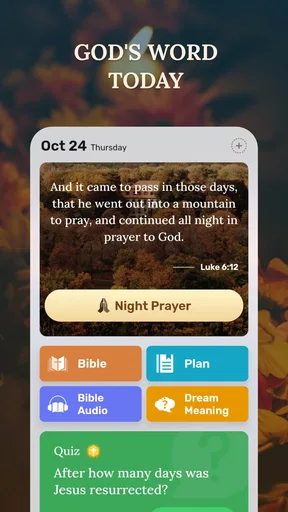
The app opens up to a home screen where you have easy access to daily verses, a complete Bible, and audio options. Navigating through the app is straightforward, and you don’t need a tech degree to find your way around. Even if you’ve never used a Bible app before, you’ll feel right at home.
Features That Stand Out
One of the coolest features is the daily verse. Every day, you receive a new verse that you can meditate on. It’s like getting a little nugget of wisdom delivered straight to your phone each morning. And if you’re anything like me, you’ll appreciate the gentle reminder to take a moment for reflection.
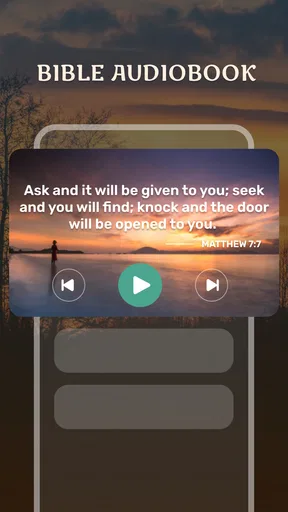
Now, let’s talk about the audio feature. You can listen to verses or entire chapters, which is perfect for those busy mornings or long commutes. Whether you’re driving, cooking, or just relaxing, the audio function allows you to immerse yourself in scripture without having to physically read. The audio is clear, and the narration is soothing, making it a pleasant experience.
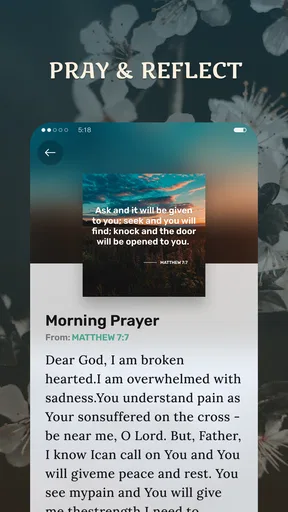
Another handy feature is the ability to bookmark and highlight your favorite verses. If you’re someone who likes to remember specific passages, this is incredibly useful. You can even add notes, which is perfect for personal reflection or group study. It’s your personalized digital Bible journal.
Why You’ll Love It
What really makes My Bible - Verse+Audio stand out is its versatility. Whether you’re a devout reader or someone just starting to explore, this app caters to all. The ability to switch between reading and listening provides flexibility, and the daily verses offer consistent inspiration.
Additionally, the app doesn’t bombard you with ads, which is a huge plus in my book. You can focus on what truly matters without constant distractions. Plus, for those who love to share inspiration, the app makes it super easy to share your favorite verses on social media or via text.
Finally, the app includes multiple translations of the Bible, so whether you prefer the King James Version or something more contemporary, you’ve got options. This is a fantastic feature for anyone looking to compare translations or deepen their understanding.
Wrapping It Up
In a world where everything is becoming increasingly digital, having an app like My Bible - Verse+Audio is a game-changer for those looking to keep their faith close at hand. It’s user-friendly, packed with features, and provides both spiritual nourishment and convenience.
Whether you’re a seasoned Bible reader or someone new to exploring scripture, this app offers something valuable for everyone. So why not give it a try? You might just find it becomes a staple in your daily routine, helping you stay connected with your spiritual side, no matter where life takes you.
Pros
- User-friendly interface with intuitive navigation.
- Extensive library of Bible translations available.
- Offline access to verses for convenience.
- Daily verse notifications for inspiration.
- Audio playback for hands-free listening.
Cons
- Limited customization for notifications.
- Ads can be distracting during use.
- Some audio features require internet.
- Occasional glitches in search function.
- In-app purchases needed for full access.
FAQs for My Bible - Verse+Audio
What features does My Bible - Verse+Audio offer?
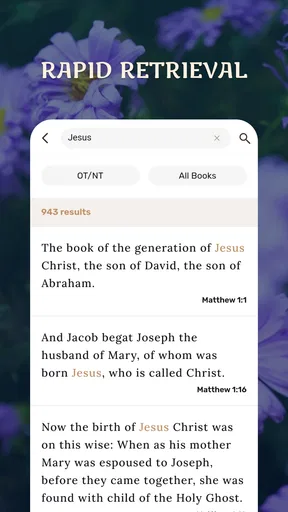
My Bible - Verse+Audio provides a comprehensive suite of features including daily verses, a wide array of Bible translations, and an integrated audio option for listening. The app also offers note-taking capabilities, bookmarks, and a search function to easily find specific passages. It's designed for both study and daily inspiration.
Is My Bible - Verse+Audio user-friendly for beginners?
Absolutely! My Bible - Verse+Audio has an intuitive interface that caters to both beginners and seasoned users. The app’s layout is straightforward, with easy navigation through chapters and verses. The audio feature is especially beneficial for those who prefer listening over reading, making it accessible for all users.
Can I use My Bible - Verse+Audio offline?
Yes, My Bible - Verse+Audio allows users to download specific versions of the Bible for offline use. This means you can read or listen to the scriptures without an internet connection, making it a convenient tool for users who are on the go or in areas with limited connectivity.
What audio options are available in My Bible - Verse+Audio?
The app offers a variety of audio options, including different narrators and speeds, to cater to user preferences. Whether you prefer a soothing voice or a more dynamic reading, the app provides customization options to enhance your listening experience, ensuring you can engage with the Bible in a way that suits you best.
Is there a cost associated with using My Bible - Verse+Audio?
My Bible - Verse+Audio is free to download with optional in-app purchases. These purchases may include additional translations or features. The free version offers a robust set of features, but users looking for more advanced options might consider the premium upgrades for a more comprehensive experience.


